
Support
Gemstone Lights® Service Request
A Gemstone Lights service request is the fastest way to get help from the Atlanta team, whether a run of lights has gone dark after a storm, the app won’t connect or you want to move up to Hub2. Tell us what you see and we will get back to you with next steps.
Before you send it
Four Things That Speed Up a Fix
None of these are required, but each one saves a phone call and gets the right part on the truck the first time.
-
Step 1: Note What You See
Which lights or zones are affected, when it started, and whether anything changed around then, like a storm, a power cut or new WiFi.
-
Step 2: Take a Photo or Two
A daytime shot of the affected section and a night shot with the lights on tell us more than a long description.
-
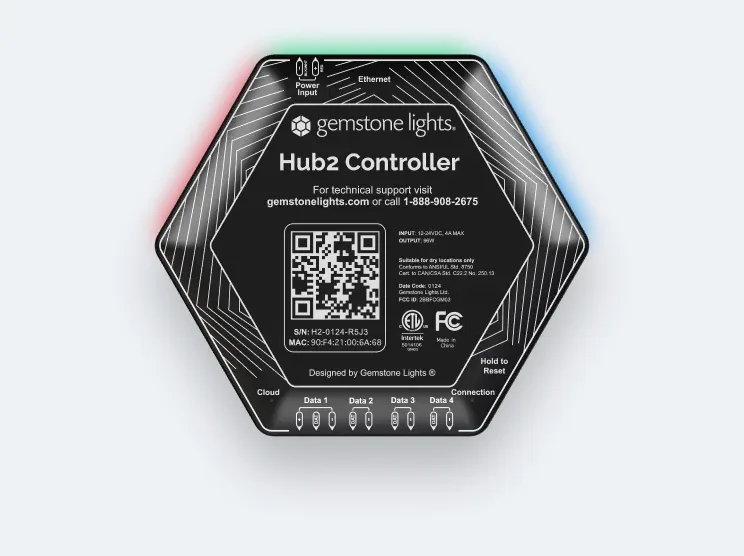
Step 3: Find the Hub Serial
It is printed on the label of your Hub controller, which is usually mounted near a power outlet, close to where the lights start.
-
Step 4: Check Your Registration
Warranty work depends on it. Not sure you registered? Say so in the form and we will help you find out.
Service request
Tell Us What’s Happening
Choose the topic that fits best. For an upgrade, pick “Hub1 → Hub2 upgrade” and add your current Hub’s serial number if you have it.
Thanks — your service request is in. We’ll review it and get back to you to arrange next steps.
Hub1 → Hub2 upgrade
Moving Up From the Original Hub
If your system went in before 2024, it probably runs on the original Hub. Hub2 is the current controller: it connects over WiFi or wired Ethernet, holds far more lights on one controller, and runs the redesigned Gemstone Lights app with Autopilot and real-time pattern status.
Existing systems work with Hub2; some need a small wiring change, which your installer handles. Pick the upgrade topic in the form above and we will confirm what your home needs before anything is ordered.
Curious what changes day to day? The Hub2 Controller page covers the hardware, and Autopilot explains the calendar feature that comes with it.
- One Hub2 runs up to 4,096 lights, against 1,000 on the original Hub
- WiFi or wired Ethernet connection
- Autopilot and the redesigned app
Warranty claims
How a Warranty Claim Works
Gemstone’s return process starts with the company that installed your lights. If that was Gemstone Lights Atlanta, this form is your claim: we look at what failed, check it against your coverage and handle the conversation with Gemstone.
If you are not satisfied with the installer’s resolution, contact Gemstone Lights at warranty@gemstonelights.com or (888) 908-2675 and get a return material authorization (RMA) number before shipping anything. The RMA number must be included in the shipping container; returns without one may be rejected and sent back freight collect.
The full steps, the exclusions and freight terms are on the warranty page, and common questions are answered in our FAQ.
Service Request Questions
We read every request and reply as soon as we can, usually by phone or email. Late fall is the busiest stretch of the year around Atlanta, so response times can run longer in November and December.
That depends on the cause. Gemstone’s warranty covers defective parts but not labor, so ask us about labor terms when we reply and we will tell you what applies before any visit is booked.
Yes, pick “App help”. Gemstone also keeps controller-specific articles in its help center, which can solve WiFi and pairing issues in a few minutes.
Yes. Choose “Hub1 → Hub2 upgrade”, add your current Hub serial number if you have it, and we will confirm whether your wiring needs any changes.
Send the request and tell us who installed it. Warranty claims start with the original installer, and Gemstone’s warranty team at warranty@gemstonelights.com can point you in the right direction if that company is no longer around.